
Framework Advisor
Understands what just happened. Decides what to do about it.
Framework Advisor is Framework Systems' AI-assisted product for the supply chain. It runs in your Dynamics 365 environment, connected to your ERP's own fields and business logic, on your choice of supported AI model.
Separate AI Advisor agents are developed and more will be available with each release. Meet the six Advisor agents.

Available today, and where it is going
Available today
AI-assisted mapping, interpretation of trading-partner specifications, mapping assistance, validation assistance, exception explanation and analysis, and troubleshooting assistance, where supported. Customers interact through the Framework Advisor interface and choose a supported AI model.
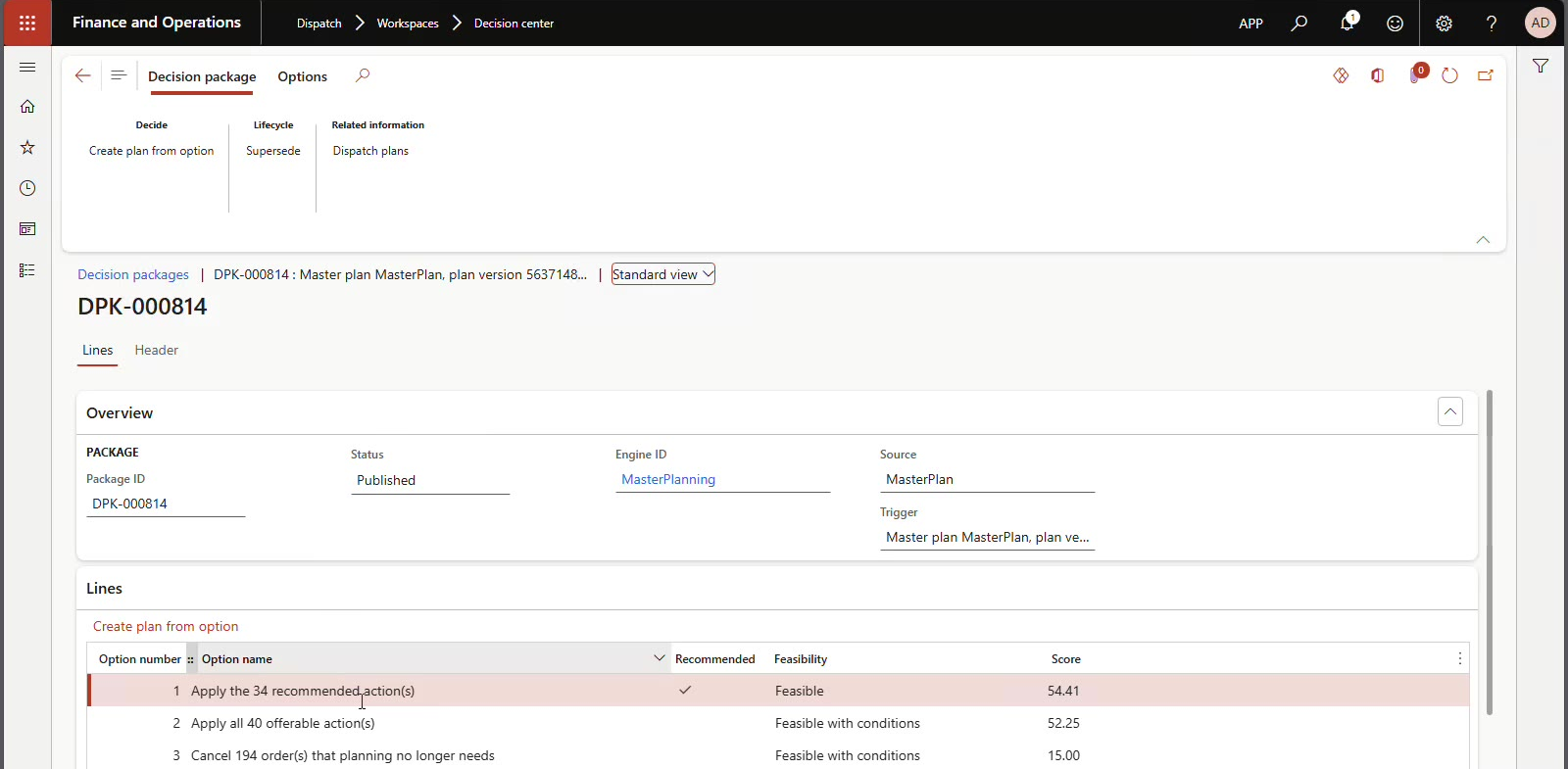
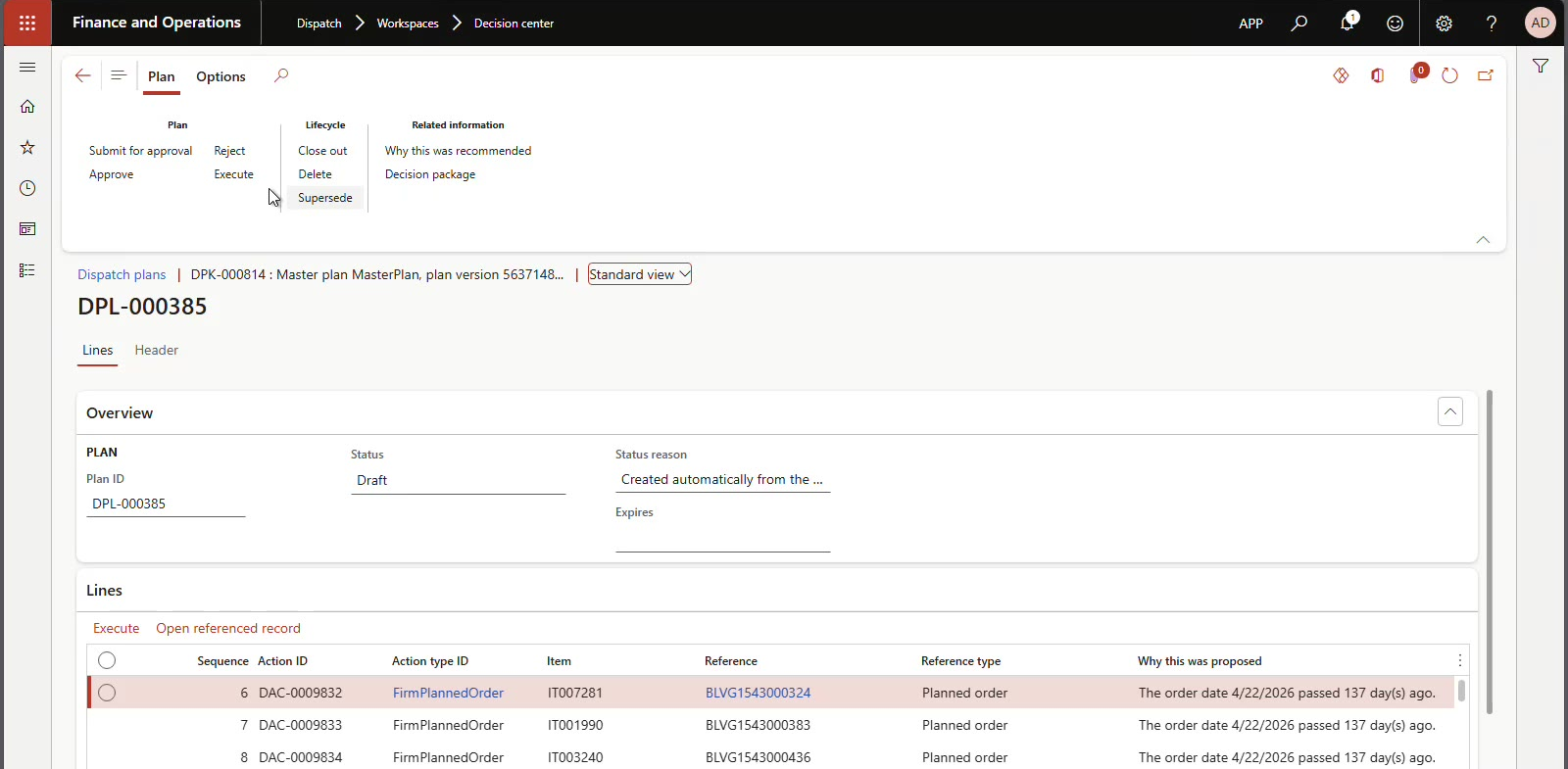
The planning decision workflow shown below: Advisor scans master planning results, builds a scored decision package, and executes the approved actions inside Finance & Operations.
Roadmap and future direction. Not generally available.
Broader correlation of external events with Microsoft Dynamics 365 operational context, understanding downstream business consequences, cross-process reasoning, and carrying external events through to governed, policy-driven action. These are future directions and are not presented as available today.
The 2027 direction: every trading-partner event Framework Interchange handles becomes something Advisor can reason about, across orders, planning, procurement and sourcing, and manufacturing. Direction, not a commitment to dates or features.
The closed loop
Connect. Understand. Decide. Act. All in the context of your Dynamics data, and nowhere else.
From business event to business response
Four steps, all inside Dynamics 365, all with a person able to say no.
Understand business events
An 850 arrives. A planned order goes stale. A supplier confirms late. A count does not match. Advisor sees each as an event, not a row.
Correlate across your supply chain
Ties partner events to orders, inventory, planning and production in Dynamics, the same data Framework Interchange already lives in.
Recommend and take action
Builds a decision package: scored options, one recommended, each action carrying the reason it was proposed. Then it asks.
Automate the business response
Approved actions execute in Finance & Operations: firm a planned order, confirm, source, create the purchase order, with a full record of who allowed what.
- Human in the loop
- Acts only within the authority you grant
- Every decision auditable
- Your choice of AI model
Advisor inside Dynamics 365: decision to execution
Two screens from the product. Options are scored and one is recommended; every action in the resulting plan carries its reason before anyone approves or executes.
You decide how much Advisor does
Start with recommendations. Extend its authority when the results have earned it. It is the same software at every level; what changes is how much of your judgment you have encoded into it.
Assist
Understands, analyzes, recommends and explains.
You execute.
Operate
Executes approved actions, confirms transactions, handles routine exceptions within defined authority.
You supervise.
Autonomous
Independent execution within policy: multi-step decisions, cross-functional reasoning, exception escalation, continuous monitoring.
You set the policy.
How Advisor relates to Framework Interchange
Framework Interchange connects the external supply chain to Microsoft Dynamics 365 and includes Interchange-specific Framework Advisor capabilities. Framework Advisor extends AI assistance into the customer's broader supply chain. Contact Framework Systems to confirm what is included for your implementation.
Microsoft is building agents into Dynamics 365 too, and we think that is the right direction. Advisor takes the same philosophy to governed execution inside Finance & Operations, on your ERP's own fields and business logic.